HeadLab is a small Mac app for AirPods Max. It watches how your head moves and turns a nod, a shake, a tilt or a tap on the ear cup into any Shortcut you like.
Menu-bar app · macOS 14 or later · needs AirPods Max
Try a gesture with your mouse
- drag turn and nod
- drag an ear cup tilt
- double-click the left cup arm for 10 s
This is HeadLab's real gesture detector, moved to JavaScript and fed by your mouse instead of your head.
How it works
You nod.
Your Mac shows a notification that says
 Nod
quick-down-up.
A Shortcuts automation listens for exactly that text and
▶︎ plays your music.
- Wear AirPods Max. Their motion sensor (it sits in the left cup) streams how your head moves, 50 times a second.
- HeadLab recognises the gesture on your Mac and posts one notification. Its text is the gesture's ID, nothing else.
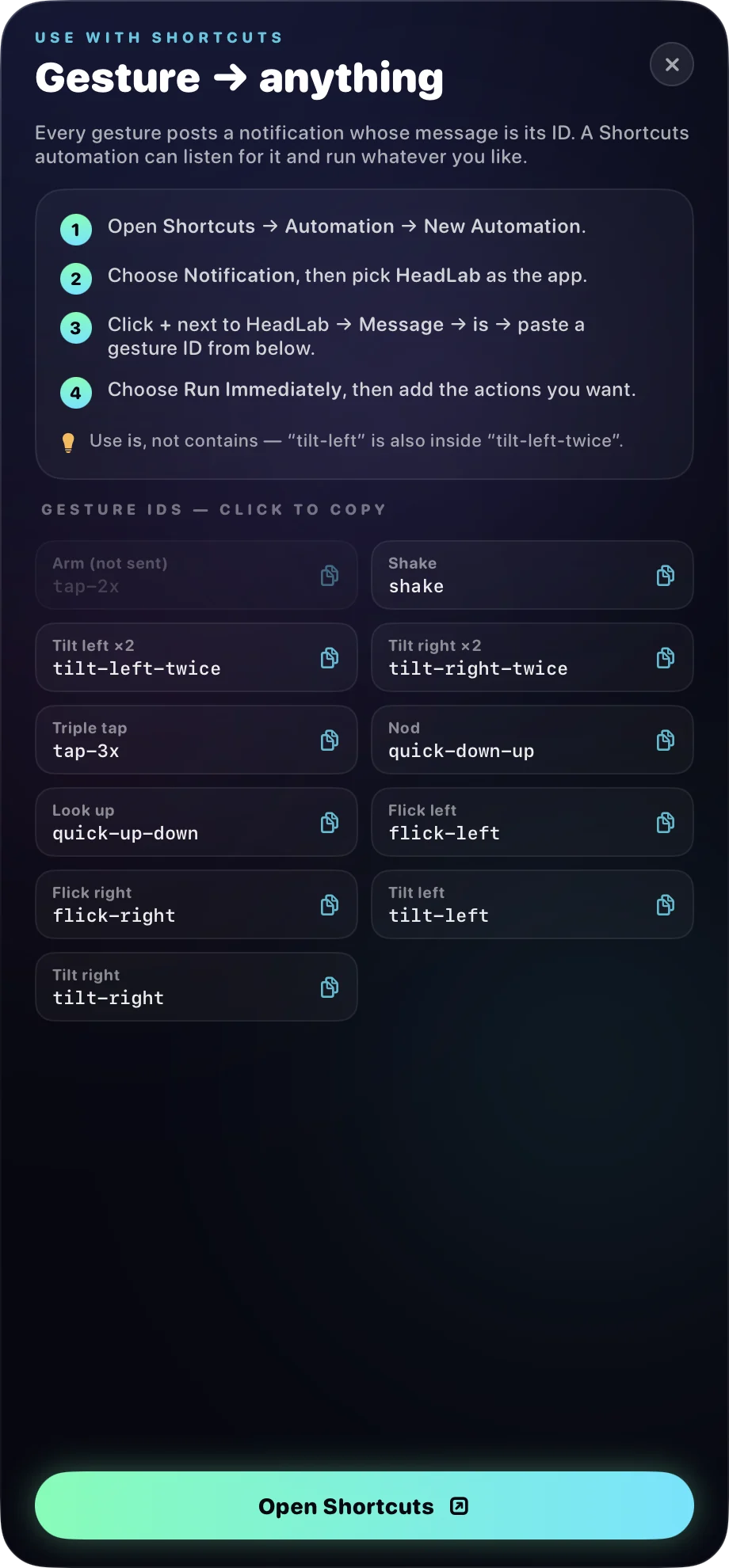
- Shortcuts does the rest. Make a personal automation: When I get a notification from HeadLab, Message is
shake, Run Immediately. Then add any actions.
Eleven gestures.
Two kinds.
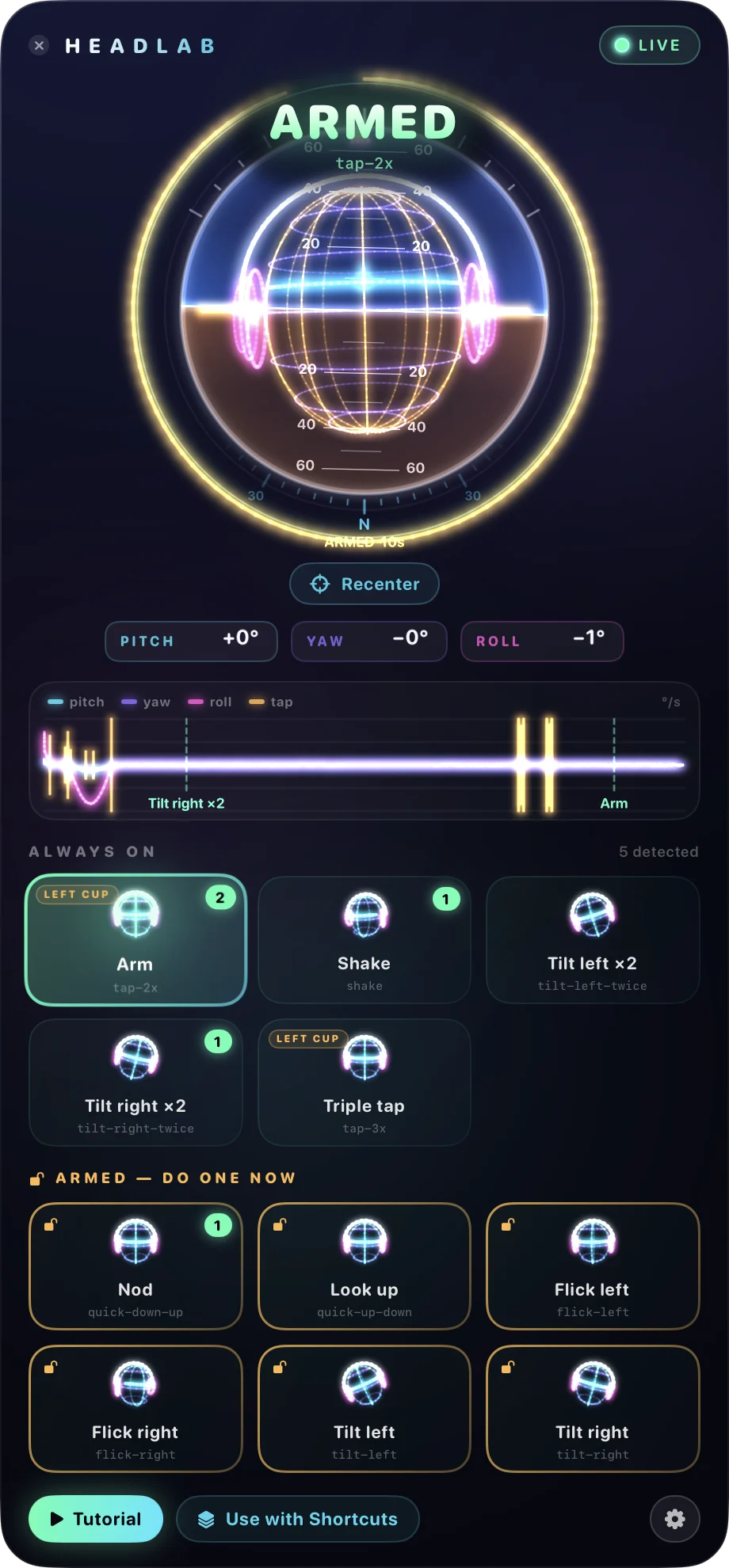
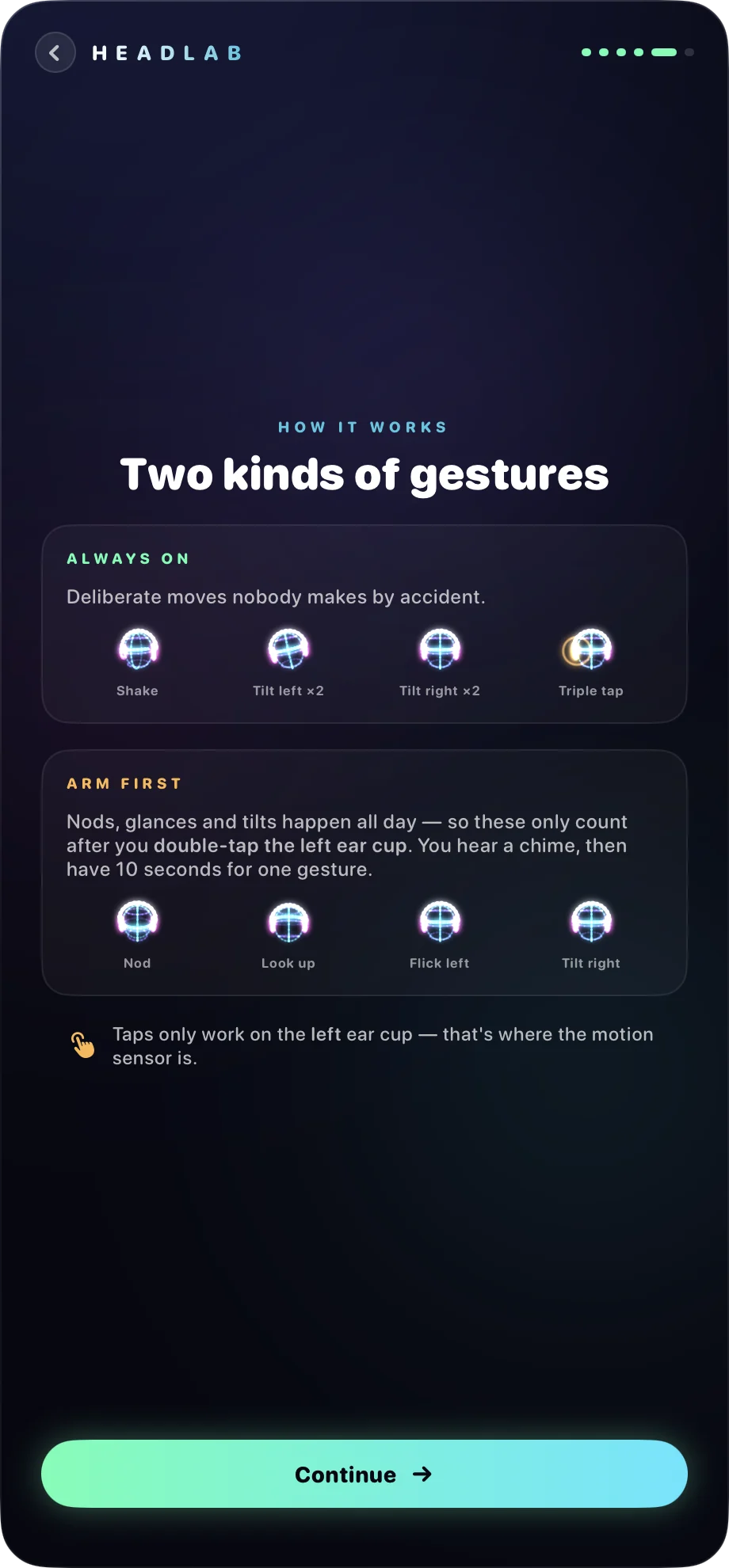
People nod along and glance around all day. So the gestures you'd make by accident only count after you double-tap the left ear cup. A chime says you're armed, and you have ten seconds for one gesture. The rest are strange enough to be always on.
Always on
Arm first double-tap the left cup, then within 10 s:
Click an ID to copy it. Paste it into the automation's Message is field. Use is, not contains: tilt-left is also inside tilt-left-twice.
A cockpit
for your head.
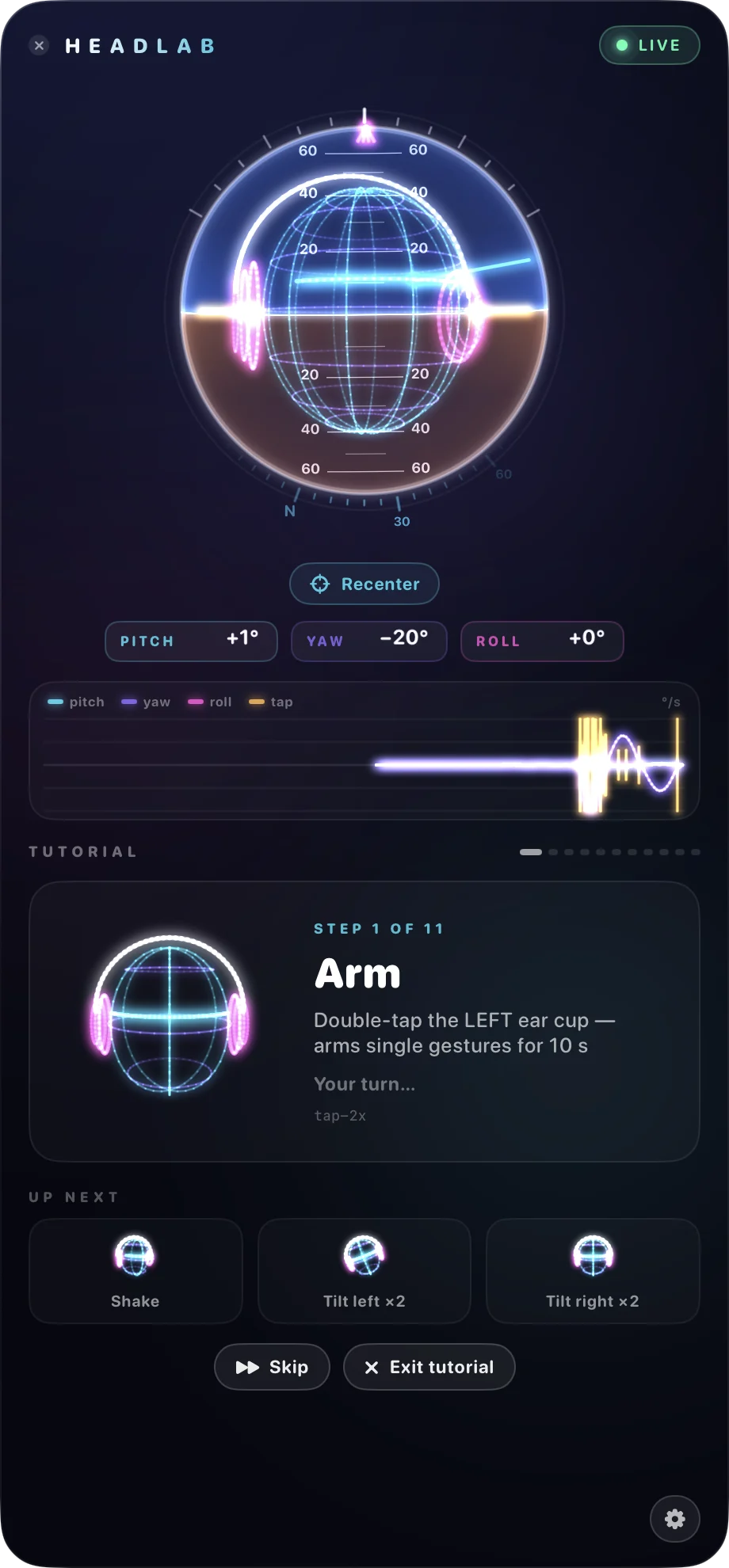
Click the menu-bar icon and HeadLab drops down a window that shows what the sensor sees: your head in 3D, an artificial horizon, a compass, and the raw motion as traces. Every gesture lights up its card. Close the window and HeadLab keeps listening in the background, using next to no CPU.
- Live head, horizon, compass. Pitch and roll come from gravity, so the horizon is real.
- Motion traces. Pitch, yaw and roll in degrees per second, with ear-cup taps in amber.
- Gesture board. Click a card to copy its ID for Shortcuts.
- Menu bar. The icon counts down while you're armed and names each gesture as it happens.
Hands full?
Nod instead.
quick-down-upPlay or pause music while your hands are in the dough.tilt-right-twiceNext track. tilt-left-twice for the previous one.shakeTurn on Do Not Disturb when the call starts.flick-rightNext slide, with a one-line AppleScript in your Shortcut.tap-3xToggle Dark Mode. Or start a 25-minute timer.quick-up-downTake a screenshot without touching the keyboard.
These are Shortcuts you build yourself. HeadLab only says which gesture happened, so it works with anything Shortcuts can do.
Try it free.
Pay once to plug it in.
Trial free
- The live head, horizon and traces
- Every gesture, recognised
- The tutorial and the chimes
- No notifications, so no Shortcuts
HeadLab $9.99
- Everything in the trial
- A notification for every gesture, so your automations run
- One payment. No subscription.
- One key works on 2 Macs
Checkout by Dodo Payments, the merchant of record (they handle tax and receipts). Your key arrives by email and on the page you land on after paying. Lost it? Look it up with your purchase email.
Press kit
Everything below is free to use in coverage of HeadLab. Need something else, a review key or a quote? Write to .


Downloads
- Everything, zippedZIP
- App icon, 1024 pxPNG
- Wordmark, darkSVG
- Wordmark, lightSVG
- Screenshot: a shake, recognisedPNG 920×1980
- Screenshot: armedPNG 920×1980
- Screenshot: tutorialPNG 920×1980
- Screenshot: Shortcuts guidePNG 920×1980
- Video: 30 s of the windowMP4


Fact sheet
- Name
- HeadLab
- Developer
- Guram Kajaia
- Platform
- macOS 14 or later, menu-bar app
- Hardware
- AirPods Max
- Price
- $9.99 once, free trial
- Released
- 2026
- Website
- headlab.app
- Gestures
- 11: shake, nod, look up, flick ×2, tilt ×2, double tilt ×2, double and triple tap
- Privacy
- Motion processed on the Mac, never stored or sent
- Contact
In one line
HeadLab turns head gestures on AirPods Max into Shortcuts on the Mac.
In a paragraph
AirPods Max have a motion sensor in the left ear cup. HeadLab, a menu-bar app for the Mac, reads it and recognises eleven gestures: a shake, a nod, a look up, quick flicks and tilts to either side, double tilts, and double or triple taps on the ear cup. Each one posts a macOS notification named after the gesture, which a Shortcuts automation can use as a trigger. To avoid accidents, the gestures people make all day only count after a double tap on the ear cup arms them for ten seconds. Everything runs on the Mac; head motion is never stored or sent anywhere. HeadLab is free to try and costs $9.99 once.
About the developer
Guram Kajaia makes small, opinionated apps for the Mac. HeadLab started as an experiment in what else the sensors in a pair of headphones could do.
Click any text block to copy it.
Questions
Does it work with AirPods Pro or other headphones?
HeadLab is made and tested for AirPods Max. macOS also streams head motion from some other Apple and Beats headphones, but the tap detection and the tuning are for AirPods Max, so we don't promise anything else. The trial is free: try it with what you have.
Will it fire when I don't mean it to?
That's the thing we worked on most. The gestures you'd make by accident (nods, glances, single tilts) only count after a double tap on the left ear cup. In about nine minutes of recorded normal use, with typing, reading and drinking tea, nothing fired.
Does HeadLab record or upload my movements?
No. Motion is analysed as it arrives and thrown away. HeadLab saves only its settings. The one thing it sends over the network is your license key, to check it, when you activate and about once a week.
Why notifications? Why not run the actions itself?
Because Shortcuts already does everything, and it's yours to set up. HeadLab's job is to notice the gesture reliably. A notification with the gesture's ID is the cleanest trigger Shortcuts offers.
I bought HeadLab before installing it. Now what?
Download it, open it, then go back to the page you landed on after paying and click Open HeadLab. Or paste the key from your email into Unlock in the app. The key also waits for you in the customer portal.
I lost my license key.
Sign in to the customer portal with the email you paid with. Your key is listed there. When HeadLab is unlocked, you can also copy the key from its Unlock page or from Settings.
Can I move my license to a new Mac?
One key works on two Macs. To free a slot, open HeadLab on the old Mac, go to Settings → License → Manage, and click Deactivate.